Sections
Language Reactor for anime: what it does well and when you want something else
Quick verdict: if you learn Japanese from Netflix on a laptop, keep Language Reactor; it is the most polished dual-subtitle tool there is. It stops being the right tool for anime in three cases: the series you want is not on your Netflix or has no Japanese subtitle track, you watch on a phone or tablet, or you want flashcards that carry the scene rather than a text line. Animei is built for exactly those cases, with its own anime catalogue, synced Japanese subtitles and reviews that keep the clip. It is not a Netflix overlay and does not pretend to be.
This is not a takedown. Language Reactor (formerly Language Learning with Netflix) has taught a lot of people a lot of languages, and for a general learner with a Netflix subscription it is close to ideal. The question here is narrower: how well does it serve someone whose Japanese input is anime, and what are the alternatives when it does not.
| Language Reactor | Animei | |
|---|---|---|
| Where it runs | Desktop Chrome (extension) | Any browser, phone or desktop (web app) |
| Video source | Netflix, YouTube, your own files and text | Built-in anime catalogue |
| Japanese subtitles | Only if the Netflix title has a Japanese track in your region | Included and synced for every series |
| Dual subtitles | Yes, Japanese plus your language | Japanese, with per-word and per-line translation on tap |
| Word lookup | Popup dictionary, word highlighting by level | Tap any word in the subtitle |
| Flashcards | Saved words and phrases, export | Built-in cards with the video clip of the line |
| Spaced repetition | Through export to another app | Built in |
| Mobile | No | Yes |
| Price | Free; Pro about $5/month; Netflix subscription needed | Free |
What Language Reactor does well
- Dual subtitles done right. Japanese and English stacked under the video, with the line you are on highlighted and the previous and next lines visible. For reading along with a show this is the gold standard.
- Playback built for study. Jump back a line, auto-pause at the end of each subtitle, slow the audio. These controls are why people pay for Pro.
- Word frequency and status. Words are colour-coded by how common they are and by whether you have marked them known, so you see at a glance what an episode will cost you.
- Beyond video. It imports text, PDFs and books, and has added conversation and listening practice tools. If you want one extension for all your input, it is a strong candidate.
- Works for any language on Netflix. Japanese is just one of dozens.
If you read that list and your anime lives on Netflix with Japanese subtitles and you watch at a desk, you are done. Stay with it.
Where it stops for anime
Japanese subtitles have to exist first
Language Reactor shows Japanese subtitles when Netflix has a Japanese subtitle track for that title in your region. For anime this is the whole problem. Netflix carries Japanese tracks for part of its catalogue, mostly its own productions, and the share varies by country. For a title without one, the extension can only show you the English, which does not help. Crunchyroll, where most seasonal anime lives, is not supported at all, and Crunchyroll rarely has Japanese tracks anyway.
You are limited to Netflix's anime
Netflix's anime catalogue is decent and changes constantly. Classic series, most currently airing shows and a lot of mid-tier titles are elsewhere. If the show you actually want to watch is not there, the tool is irrelevant, however good it is.
No phone, no tablet
It is a desktop Chrome extension. The Netflix and YouTube mobile apps cannot load it, and there is no app of its own. If most of your anime time is on the couch or the train with a phone, Language Reactor cannot follow you there. This is the single most common reason people search for an alternative.
Cards are text, reviews are elsewhere
You can save words and phrases and export them, which is fine for a text-based Anki workflow. What you do not get is the scene: when you review a word a week later, you see the word and the sentence, not the moment in the episode where you heard it. For anime that moment is most of what makes the word memorable.
Animei: the anime-specific alternative
Animei starts from the other end: instead of overlaying tools on a video service, it brings the anime, the Japanese subtitles and the dictionary together in one web app.
- Subtitles are included and synced. Every series in the catalogue has Japanese subtitles matched to the video by the app, not by you. You never check a subtitle menu or shift timing.
- Tap a word, save a word. The subtitle line is segmented into real words. Tap one for its reading and meaning, tap again to save it. Long lines get a translation of the whole line on request.
- Cards keep the clip. Each saved word becomes a flashcard with the sentence and the video clip of that exact line. Reviews put you back in the scene.
- Reviews are built in. Spaced repetition with daily limits and an "I already know this" skip, plus a coverage number per episode so you can see a show getting easier.
- Phone first. It runs in the browser on phones, tablets and desktops, and installs to the home screen.
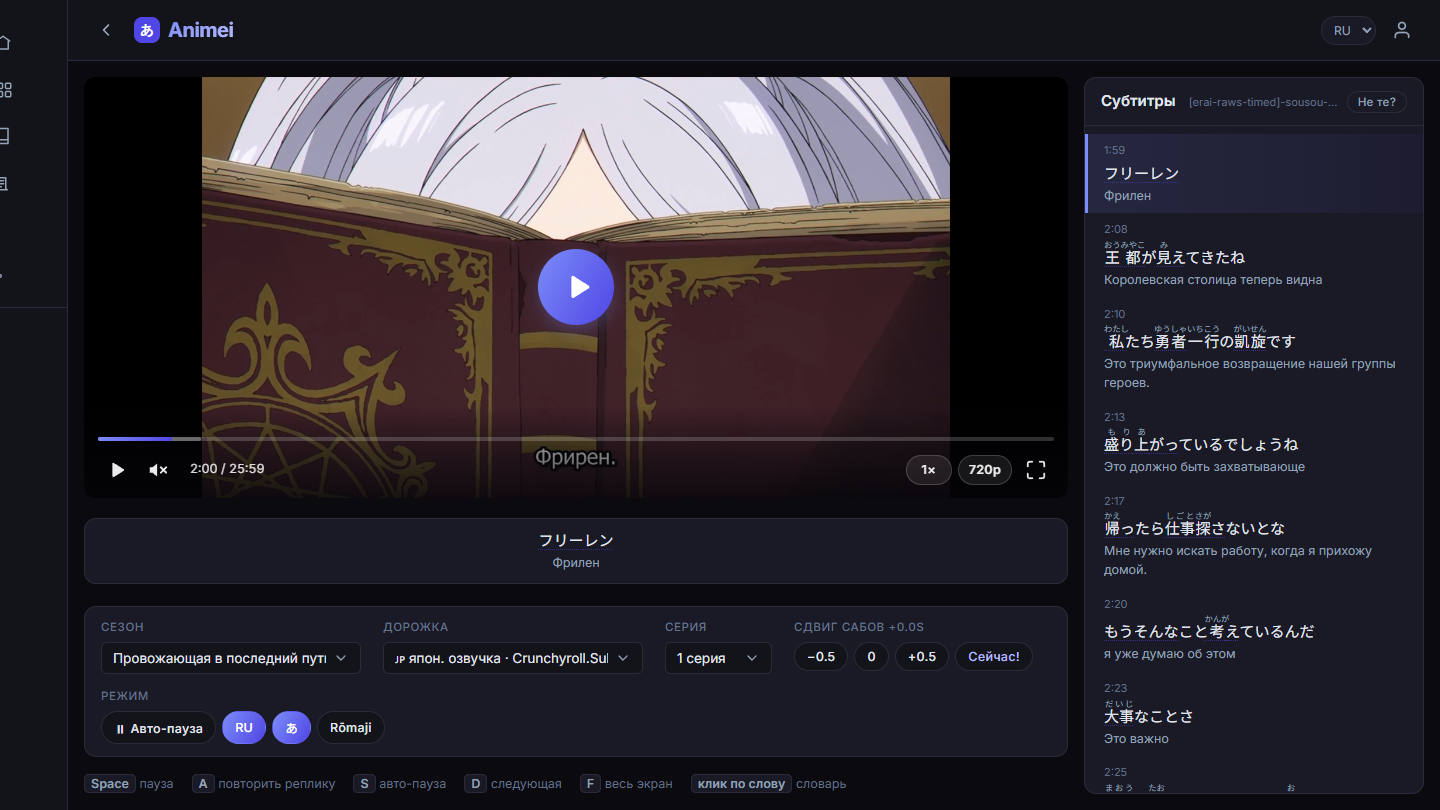
And the honest limits: it is anime only, from its own catalogue. It will not overlay Netflix or YouTube, does not do dual subtitles in the Language Reactor sense, has no Anki export, and has none of the text and book import. If your learning is broader than anime, you will want Language Reactor or asbplayer alongside it.
Who should pick what
- Stay with Language Reactor if your shows are on Netflix with Japanese tracks, you watch at a desk, and you like the frequency colouring and playback controls.
- Pick Animei if you watch anime on a phone, your series are not on Netflix, or you want reviews that keep the scene and need zero setup.
- Use asbplayer if you have your own video files and an Anki habit; see our asbplayer comparison.
- Use both. Language Reactor for Netflix on the laptop, Animei on the phone. Both have free tiers.
Whichever you choose, start with a series whose dialogue is on your level. We counted the subtitles of 42 popular anime and ranked them by how much of what characters say is JLPT N5–N4 vocabulary.
Anime with Japanese subtitles, on your phoneRuns in the browser, nothing to install · free, no accountFAQ
Does Language Reactor work on a phone?
No. It is a Chrome extension for desktop browsers. There is no iOS or Android version, and the Netflix and YouTube mobile apps cannot load extensions.
Does Language Reactor work with Crunchyroll?
No. At the time of writing it supports Netflix and YouTube, plus text and video you import yourself. Crunchyroll is not supported, and Crunchyroll rarely offers Japanese subtitle tracks anyway.
Is Language Reactor free?
The core extension is free. Pro, around five dollars a month at the time of writing, adds machine translations and extra subtitle and playback options. You also need your own Netflix subscription.
Is Animei a replacement for Language Reactor?
Only for anime, and only if you do not need Netflix. Animei has its own catalogue with synced Japanese subtitles, tap-to-look-up words and built-in reviews, and it runs on phones. It will not overlay anything on Netflix or YouTube.